

Governed AI for operational workflows isn’t just another automation buzzword. It’s a fundamental shift in how enterprise teams execute work: AI agents autonomously invoke pre-approved processes, make intelligent decisions about which tools to use, and execute complex tasks end-to-end without human intervention at every step.
If you’re managing operations across RevOps, Finance, Customer Success, or Sales, you’re probably drowning in fragmented systems, manual workarounds, and integrations that break every other sprint. Governed AI fixes that. It gives you AI that actually follows your rules, audits its own work, and operates with the control your business needs.
Here’s what you need to know about implementing governed AI in your operational workflows.
Related: What Is an Operational Audit? Complete Guide for 2026
Related: What Is a RevOps Platform? A Practical Guide for 2026
What Exactly Is Governed AI for Operational Workflows?
Think of governed AI as intelligent automation with guardrails built in. Your AI agents don’t just execute random tasks. Instead, they operate within a pre-defined set of approved workflows, rules, and compliance boundaries.
Here’s the breakdown: You design and approve specific operational processes (like lead qualification, invoice processing, or customer health scoring). Your AI agent learns these workflows as callable tools. When work comes in, the agent autonomously decides which approved process to invoke, executes it, and hands back the result. No human clicking buttons. No waiting for someone to remember the 47-step process.
The “governed” part is non-negotiable. Every action the AI takes is traceable, auditable, and within boundaries you’ve explicitly set. That’s the difference between Flows360 and generic automation tools: governance isn’t bolted on afterward. It’s the foundation.
Why Governed AI Matters for Enterprise Operations
Let’s be direct: most companies are still running operations like it’s 2015.
You have your CRM. You have your ERP. You have your data warehouse. They don’t talk to each other without some brittle, hard-coded integration that breaks when vendors update their APIs. So you hire someone to manually reconcile data in spreadsheets three times a week. That person leaves. You’re stuck.
Governed AI fixes this at the root. Instead of building fragile point-to-point integrations, you define workflows that span systems. Your AI agent becomes the connective tissue. It knows how to pull data from your CRM, enrich it with financial data, apply business logic, and update your downstream systems, all autonomously, all governed, all traceable.
The efficiency gains are real. Organizations that deploy AI agents across operational workflows report up to 90% reduction in manual work for those processes. But more important than the speed: you get control and visibility. You know exactly what your AI did, why it did it, and whether it complied with your policies.
How to Design Governed Workflows for AI Agents
Start with your biggest pain point. Not the most complex process. The one that’s bleeding time and money right now.
For most RevOps teams, that’s lead scoring and routing. For Finance, it’s invoice matching and reconciliation. For Customer Success, it’s health scoring and churn prediction. Pick one.
Next, document the actual workflow. Not the idealized workflow from your wiki. The one people actually follow. Talk to the team doing the work. Most teams discover their “process” is way more nuanced than they thought, there are edge cases, manual quality checks, judgment calls.
Here’s what governed AI needs:
- Clear decision points: Where does a human need to decide, and where can rules handle it?
- System connections: Which systems feed data in, and which ones get updated?
- Compliance boundaries: What’s off-limits? Data privacy rules? Audit trails?
- Approval gates: Do certain actions need human sign-off before execution?
- Fallback behavior: What happens when the AI hits uncertainty?
Once you’ve mapped this, your AI agent can execute it. And here’s the key: your agent can be smart about variations. If lead source A requires different scoring than lead source B, the agent handles that. If a customer record has incomplete data, it can route to human review. If compliance rules flag an action, it pauses and notifies your team.
This is where most generic workflow automation tools fall apart. They want you to design one rigid flow that applies to everyone. Real operational workflows have branches, exceptions, and judgment calls. Governed AI handles the 90% of cases that fit your rules, and escalates the rest with full context.
Building Auditability Into Your Workflows

If you’re in regulated industries, Finance, Healthcare, any B2B with SOX compliance, auditability isn’t optional. It’s the entire game.
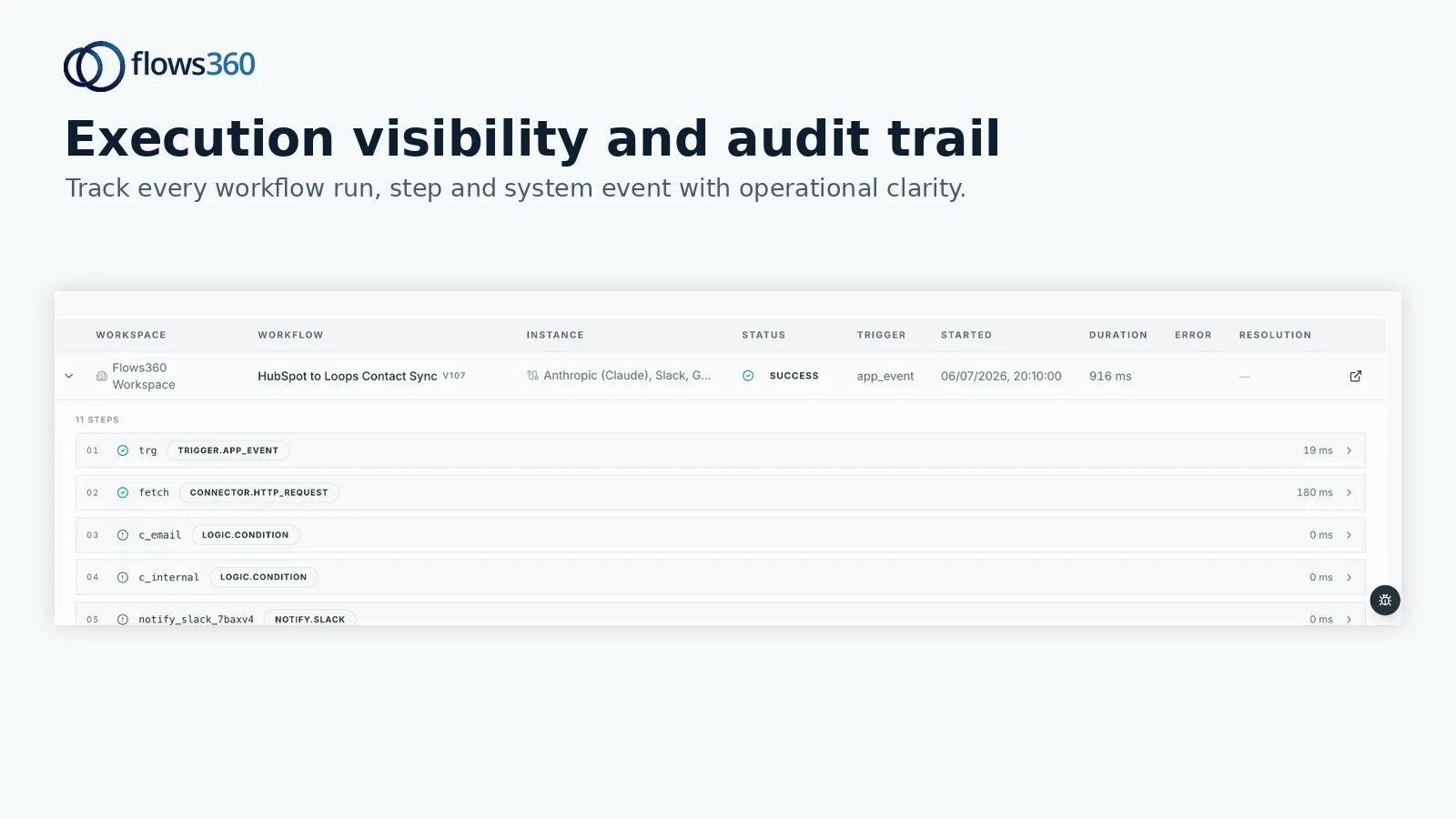
Governed AI workflows need to log every decision point. Not just “the AI executed this workflow.” More like: “At 2:47 PM, the agent evaluated lead score thresholds against rules X and Y, determined this prospect qualified, applied discount logic based on customer tier, and updated the CRM record. Here’s the supporting data that informed each decision.”
This is why systems like Flows360 exist. They’re built to capture that audit trail automatically. You don’t have to retrofit compliance into your workflows later. It’s baked in from day one.
See where your workflows are leaking time?
Real quick on this: if your current automation tools can’t produce an audit trail that your legal or compliance team accepts, they’re not enterprise-ready. Period.
Common Use Cases for Governed AI Workflows
Finance and accounting teams are leading adoption. AI agents now handle invoice processing at scale, matching POs to invoices to receipts, flagging discrepancies, routing exceptions to the right person, and executing approvals based on spend thresholds.
HR operations is another hot spot. Employee onboarding, offboarding, access provisioning, these are perfect governed workflows. The rules are clear, the systems are fixed, and the compliance requirements are non-negotiable. AI agents nail this.
In RevOps and Sales, governed AI handles lead qualification, routing, and initial outreach sequences. Your agent knows your ICP, your territory rules, and your commission structures. It scores leads, routes them to the right rep, and logs every decision in your CRM.
Customer Success teams use governed workflows for health scoring and churn prediction. Instead of analysts manually checking 200 accounts every week, your AI agent continuously monitors data, flags at-risk customers, and triggers interventions based on your playbooks.
IT operations is emerging as a big one too. Ticket routing, access request approvals, password resets, governed workflows handle the routine stuff instantly while escalating genuinely complex issues to humans.
Governance Controls You Actually Need
Here’s what separates governed AI from AI that just does whatever it wants:
Approval workflows: Certain actions require human sign-off before execution. Your compliance officer signs off on any data export. Your Sales VP reviews territory assignments in Q1. Build this in upfront.
Data access controls: Your AI can pull from System A and write to System B, but not access PII in System C. Enforce this at the workflow level, not just at the database layer.
Rate limiting and quotas: Prevent runaway AI. Set caps on how many records an agent can process per hour, how many customer outreach messages it sends per day, how much discount it can apply per transaction.
Real-time monitoring: If your AI starts behaving weirdly, you need to see it immediately and kill it. Not “we’ll look at logs tomorrow.” Right now.
Rollback capability: If a workflow made a mistake and updated 500 records incorrectly, you need to roll it back. Not manually. Automatically.
These aren’t nice-to-haves. They’re table stakes. If your workflow orchestration platform doesn’t support them natively, you’re building governance on sand.
Integrating Governed AI With Your Existing Systems

Your AI doesn’t live in a vacuum. It needs to talk to your CRM, your ERP, your data warehouse, your accounting system, your HRIS, whatever.
The good news: most enterprise systems have APIs. The bad news: they’re all different. Your CRM rate-limits you to 100 requests per minute. Your ERP uses a different auth mechanism. Your data warehouse is read-only. Your accounting system batches updates at midnight.
A governed workflow platform handles this complexity. It manages API connections, handles retries and backoffs, queues updates intelligently, and reconciles data when systems temporarily disagree. Your AI agent doesn’t know or care about these details. It just says “update this customer record” and the platform figures it out.
This is why integration is so central to Flows360‘s design. You’re not just automating workflows. You’re connecting fragmented systems and making them work as one coherent platform.
Measuring Success With Governed AI Workflows
You should measure three things: speed, accuracy, and compliance.
Speed: How long did this workflow take before? How long now? Governed AI usually cuts cycle time by 70-90% because there’s no waiting for humans to do manual steps.
Accuracy: Did the AI make the right calls? Governed workflows actually improve accuracy over time because they eliminate human error (bad memory, inconsistent application of rules). Audit the first 100 results. After that, trust your governance controls.
Compliance: Did you maintain your audit trail? Did approval workflows trigger correctly? Did data access controls prevent unauthorized queries? This matters more than you think.
Most teams also track cost per workflow execution and team capacity freed up. If you save your finance team 40 hours a week on invoice processing, that’s capacity they can spend on analysis instead of data entry.
Getting Started With Governed AI in Your Workflows
Don’t try to automate everything at once. Pick your highest-impact, lowest-risk workflow. That’s usually something that’s already well-documented, high-volume, and follows consistent rules.
Phase 1: Map the workflow, define approval gates, and identify all system connections.
Phase 2: Build the workflow in your orchestration platform. Test against real data in a sandbox.
Phase 3: Run parallel with your current process for 2 weeks. Compare results. Adjust rules.
Phase 4: Go live with guardrails. Start with limited volume (maybe 10% of daily requests), monitor heavily, and gradually expand.
Once you’ve got one workflow running smoothly, the second one is 3x faster to deploy. You’ve got the playbook. Your team knows how to think about governed workflows. The momentum builds.
This is where organizations that invest in the right platform, one built for governance and multi-system integration, pull away from the rest. They’re not reinventing their architecture every time they add a workflow.
Why Your Current Tools Probably Can’t Handle This
Generic workflow automation platforms were designed for simpler use cases. They’re great if you want to connect Slack to Salesforce and create a message when a deal closes. They fall apart when you need audit trails, compliance controls, multi-system synchronization, and intelligent decision-making.
RPA tools focus on mimicking human clicks. That’s fragile and slow.
Basic iPaaS platforms handle data integration but not workflow orchestration or AI decision-making.
What you actually need is a platform designed specifically for governed operational workflows. One that speaks your language (RevOps, Finance, Operations), understands compliance requirements, and makes it easy to orchestrate work across your entire tech stack.
That’s exactly what Flows360 is built for. Enterprise teams across RevOps, Finance, Customer Success, and Sales use it to connect their fragmented systems and run governed, auditable workflows at scale.
What’s the difference between governed AI and regular automation?
Regular automation executes a sequence of steps. Governed AI executes steps within pre-defined boundaries, logs every decision, respects approval workflows, and escalates edge cases to humans. It’s auditable, controlled, and designed for enterprise compliance.
Do I need AI to have governed workflows?
Not necessarily. You can have governed workflows without AI, just processes with approval gates and audit trails. But adding AI agents lets those workflows become truly autonomous. Your agents invoke approved processes intelligently based on context.
How long does it take to build a governed workflow?
Your first workflow typically takes 4-6 weeks from requirements to production. Mapping the process, building integrations, testing, and going live. After that, each subsequent workflow is faster (2-3 weeks) because you’re working within an established platform and your team understands the methodology.
Can I audit governed AI workflows after they execute?
Yes. That’s the whole point. Every action the AI took, every rule it evaluated, every data point it considered, all logged. You can pull audit reports showing exactly what happened, why, and whether it complied with your policies. This is non-negotiable for regulated industries.
See where your workflows are leaking time?