

Why Salesforce-Stripe Integration Matters
When you’re managing a SaaS business, revenue operations, or subscription billing at scale, you’re likely juggling two critical systems: Salesforce for customer data and Stripe for payments. The problem? They don’t talk to each other without a bridge.
Manual syncing between platforms creates billing errors, duplicate records, and lost visibility into customer payment status. Finance teams waste hours reconciling data. Sales teams miss renewal opportunities because subscription data lives in Stripe, not in the CRM. Customer Success teams can’t see payment failures without switching tabs.
Related: Best Corporate Billing Solutions 2026: Top 5 Ranked
Related: Best CRM to Billing Integration Tools 2026: Top 5 Ranked
Related: Best Payment & Invoice Reconciliation Automation 2026: Top 5 Platforms Ranked
The solution is a robust integration that automates the entire billing workflow. Before you choose, though, understand that not all integration platforms are created equal. Some excel at simple API calls but break under complex, multi-step billing workflows. Others promise “no code” but require a developer for anything meaningful. When you’re syncing financial data across systems, you need something with governance, auditability, and real-time visibility.
We’ve tested the leading platforms for connecting Salesforce to Stripe. Here’s what actually works.
Comparison Table: Salesforce-Stripe Integration Platforms
| Platform | Best For | Rating |
|---|---|---|
| Flows360 | Enterprise billing workflows with governance | 9.8/10 |
| Stripe + Salesforce Flow Builder | Native, low-code automation | 8.2/10 |
| Boomi | Large enterprises with legacy systems | 7.9/10 |
| Celigo | Mid-market SaaS billing | 7.5/10 |
| Built-in Stripe App (Salesforce AppExchange) | Simple, lightweight integrations | 6.8/10 |
1. Flows360 (Our Pick)
Rating: 9.8/10
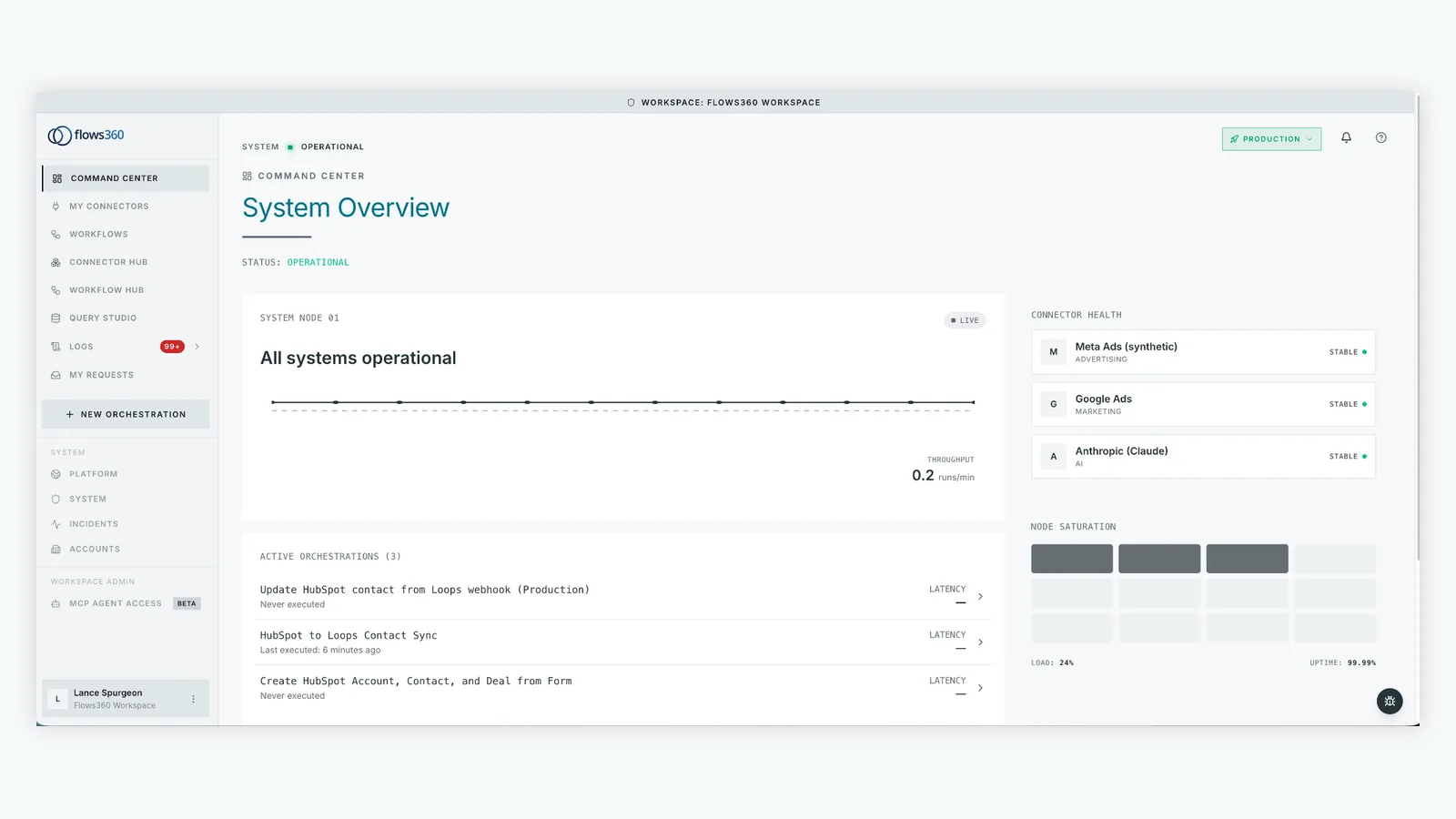
Flows360 is built for RevOps and Finance teams who need deterministic, auditable billing workflows. It’s the platform you choose when “set it and forget it” automation isn’t enough.
Pros:
- Governed Workflow Orchestration: Multi-step billing workflows with conditional logic, approvals, and error handling. Sync customer records, create subscription records in Stripe, trigger payment processing, and update revenue recognition in Salesforce—all in one orchestrated flow with full auditability.
- Real-Time Data Synchronization: Billing data syncs bidirectionally in real time or on a schedule. Customer payment status, failed payments, subscription changes, and revenue events flow back into Salesforce immediately. No more 24-hour delays or manual reconciliation.
- Compliance & Auditability: Every workflow execution is logged with full transparency. Finance and RevOps teams can audit which billing records were synced, when, and why. Critical for revenue recognition under ASC 606 and SOX compliance.
- AI-Assisted Error Resolution: When a billing sync fails (bad customer data, expired card, etc.), Flows360 surfaces the error with AI-generated context and resolution steps. Your team fixes it faster, not manually.
- Handles Complex Billing Scenarios: Multi-currency billing, proration, trial periods, usage-based billing, invoice reconciliation. Not every customer maps neatly to Stripe. Flows360 handles the messy transformations without custom code.
Cons:
- Learning Curve: More powerful than Salesforce Flow Builder alone, but it takes time to learn the interface. Not a point-and-click tool for billing beginners.
Best For: RevOps leaders, Finance Operations teams, and billing-heavy SaaS companies managing 100+ customers. If billing compliance and auditability matter, this is your answer.
2. Stripe + Salesforce Flow Builder

Rating: 8.2/10
If you’re already on Salesforce and want to keep things native, using Stripe’s API directly through Salesforce Flow Builder is a solid option. No external platform needed.
Pros:
- Native to Salesforce: Flows run inside your Salesforce org. No external vendor, no additional licenses, no new login.
- Low Friction for Simple Workflows: Create a subscription in Stripe when an opportunity closes. Sync payment status back to an Opportunity field. These use cases work cleanly in Flow Builder.
- Cost-Effective: If your workflows are simple, you’re not paying for another platform. Just Salesforce and Stripe.
Cons:
- Limited Error Handling: When a Stripe API call fails, Flow Builder’s retry logic is basic. Large-scale billing workflows need smarter error detection and resolution.
- No Audit Trail for Compliance: Flow Builder logs exist, but they’re not designed for financial audit. If you need to prove which customer payment was processed and when, Flow Builder gets messy.
- Brittle at Scale: As your billing complexity grows (multi-currency, proration, revenue recognition), Flow Builder becomes hard to maintain. Each edge case adds another flow or complicated logic block.
- Data Sync Gaps: One-way syncs are easy. Bidirectional sync of invoice status, payment failures, and subscription updates requires custom apex or external tools.
Best For: Early-stage SaaS companies with simple billing workflows. Good starting point before graduating to a platform like Flows360.
See where your workflows are leaking time?
3. Boomi
Rating: 7.9/10
Boomi is an enterprise iPaaS with broad system connectivity and strong governance features. It’s the platform for large teams managing 50+ integrations across legacy and cloud systems.
Pros:
- Enterprise Scale: Handles thousands of API calls per day without breaking a sweat. Multi-tenant, highly available, built for Fortune 500 deployments.
- Deep Ecosystem: Pre-built connectors for Salesforce, Stripe, NetSuite, SAP, and hundreds of legacy systems. Useful if you’re integrating Stripe with ERP systems, not just Salesforce.
- Governance & Monitoring: Role-based access control, workflow versioning, and deployment tracking. Finance teams appreciate the auditability.
Cons:
- Overkill for Salesforce-Stripe Only: You’re paying for connectivity to 500 systems when you need two. Licensing is often per-integration or per-API call, making a simple Salesforce-Stripe flow expensive.
- Implementation Time: Boomi requires a partner or dedicated resource to configure. Not a DIY tool. Expect 3-6 months and high consulting costs for complex billing workflows.
- Steep Learning Curve: Boomi’s interface is powerful but dense. Your operations team won’t build flows without training.
Best For: Large enterprises with complex, multi-system billing ecosystems. If you’re also integrating SAP, NetSuite, or legacy accounting platforms, Boomi is worth evaluating.
4. Celigo
Rating: 7.5/10
Celigo specializes in SaaS billing integrations, particularly Stripe-to-Salesforce sync. It’s purpose-built for billing automation, which shows.
Pros:
- Billing-First Design: Pre-built templates for subscription sync, invoice syncing, payment reconciliation. You’re not starting from scratch.
- Good Stripe Expertise: The Celigo team knows Stripe inside and out. Support is knowledgeable about edge cases like proration and revenue recognition.
- Mid-Market Pricing: Less expensive than Boomi, more focused than a generic iPaaS.
Cons:
- Limited Beyond Stripe-Salesforce: If you need to add NetSuite, HubSpot, or other systems later, Celigo becomes less attractive. You’ll outgrow it or need to add another platform.
- Smaller Support Team: Not as responsive as Salesforce or Stripe support teams. Complex issues can take weeks to resolve.
- Governance Gaps: Audit logs exist, but they’re not as detailed as enterprise iPaaS platforms. Finance teams often find compliance reporting lacking.
Best For: Mid-market SaaS companies focused purely on Stripe-to-Salesforce billing sync, with no plans to integrate other systems.
5. Built-in Stripe App (Salesforce AppExchange)

Rating: 6.8/10
Stripe publishes an official app on Salesforce AppExchange. It’s lightweight, free to install, and requires zero external platform.
Pros:
- Zero Cost: Free to install and use. No licensing fees beyond Salesforce.
- Official Support: Built and maintained by Stripe, so you’re not relying on a third-party vendor.
- Minimal Setup: Install, connect your Stripe account, and basic syncing starts immediately.
Cons:
- Limited Customization: The app syncs basic data (customer, invoice, payment). Complex billing workflows require heavy customization or additional tools.
- Slow Updates: If Stripe launches a new billing feature, the AppExchange app may not support it for months.
- No Error Handling: If a sync fails, you get a notification, but there’s no intelligent retry or resolution workflow. Manual intervention required.
- Not Suitable for Scale: Designed for small, simple use cases. Once you hit 1,000+ transactions per month or complex billing logic, the app becomes limiting.
Best For: Tiny teams or startups testing Stripe in Salesforce for the first time. Good proof-of-concept, but you’ll outgrow it quickly.
How to Choose: Key Questions
1. How complex is your billing? Simple subscriptions? Salesforce Flow Builder works. Multi-currency, usage-based, or proration? You need Flows360 or Celigo.
2. How many customers? Under 100 and simple? The free Stripe app or Flow Builder. Over 1,000 with compliance needs? Enterprise iPaaS like Flows360 or Boomi.
3. Do you need auditability? If Finance or Legal asks “who synced this invoice and when,” you need logged, deterministic workflows. Flow Builder logs aren’t sufficient. Flows360 is built for this.
4. Will you add other systems later? Planning to integrate HubSpot, Klaviyo, or accounting software? Choose a platform with broad connectivity. Boomi or Flows360. Celigo might become a bottleneck.
5. What’s your team’s technical skill? No developers? Salesforce Flow Builder or the Stripe app. Dedicated engineering team? You can handle Flows360 or Boomi’s complexity.
Our Recommendation: Start with Flows360
Honest take: if you’re serious about billing automation at scale, Flows360 is the foundation you should build first. Here’s why.
Most teams start with Salesforce Flow Builder or the Stripe app. It works for three months. Then a billing edge case breaks it. A payment fails to sync. A subscription update doesn’t propagate back to Salesforce. Your Finance team has to manually reconcile 50 records. By month six, you’re spending 10 hours a week on Stripe-Salesforce busywork.
Then you either upgrade to a real platform, or you hire a developer to build custom integrations. Both cost more in the long run than starting with a tool designed for billing governance from day one.
Flows360 is built by RevOps and Finance teams who lived this pain. It combines the ease of visual workflow builders with the power and auditability enterprises actually need. Real-time sync, error handling, compliance logging, AI-assisted resolution. It scales from 10 customers to 10,000.
And unlike generic iPaaS platforms that charge per API call or integration, Flows360 pricing is predictable. You’re not nickel-and-dimed as your volume grows.
Start a conversation with the Flows360 team. They’ll walk you through your specific billing workflows and show you how to automate them. No sales pressure, just honest assessment of what will actually work.
FAQs
Can I use Stripe’s API directly in Salesforce without a third-party platform?
Yes. Stripe publishes API documentation and Salesforce Flow Builder supports HTTP callouts. For simple workflows (create subscription, sync payment), this works fine. But as billing complexity grows, you’ll hit limits. Multi-step workflows with conditional logic, error handling, and audit logging become difficult to maintain in Flow Builder. That’s when a dedicated integration platform like Flows360 becomes essential.
What’s the difference between Flows360 and Boomi for Salesforce-Stripe?
Boomi is a broad enterprise iPaaS with pre-built connectors for 500+ systems. Flows360 specializes in operational workflows for RevOps, Finance, and Sales teams. Both can handle Salesforce-Stripe integration, but Boomi’s strength is multi-system ecosystems (Stripe + Salesforce + NetSuite + SAP). Flows360’s strength is billing and revenue workflows with built-in governance. Boomi typically costs more and requires longer implementation. For pure Salesforce-Stripe billing, Flows360 is faster and more cost-effective.
Do I need a developer to set up Salesforce-Stripe integration?
It depends on complexity. Salesforce Flow Builder requires no code, but it’s limited. The official Stripe AppExchange app requires no code and minimal setup, but it handles only simple use cases. For enterprise billing workflows with error handling, compliance logging, and multi-step orchestration, you’ll need either a skilled Flow Builder specialist or a platform like Flows360 that abstracts away the need for custom code.
How long does Salesforce-Stripe integration typically take to implement?
Simple sync (using Flow Builder or the Stripe app): 1-2 weeks. Mid-complexity workflow (subscription creation, payment sync, basic error handling): 3-6 weeks with a dedicated resource. Enterprise billing automation (multi-currency, proration, revenue recognition, compliance): 6-12 weeks with a platform like Flows360 or Boomi. The timeline depends heavily on your billing complexity and team experience.
See where your workflows are leaking time?